1. The Anatomy of the GA4 BigQuery Problem
When engineering teams first connect the native GA4 BigQuery export, they expect a relational database of web analytics. Instead, Google hands them an event-level append-only log packed with deeply nested RECORD arrays:
project.analytics_<property_id>.events_YYYYMMDD
├── event_date: STRING ('20261027')
├── event_timestamp: INT64 (1761561600000000)
├── event_name: STRING ('page_view')
├── event_params: REPEATED RECORD
│   ├── key: STRING ('ga_session_id')
│   └── value: RECORD (string_value, int_value, float_value, double_value)
├── collected_traffic_source: RECORD
├── privacy_info: RECORD
└── items: REPEATED RECORD
For analysts and BI tools (Looker Studio, Power BI, Tableau), querying this structure directly creates six severe operational bottlenecks:
- Catastrophic Slot Consumption & Scanning Costs: Every single parameter lookup (
page_location, rawga_session_id,session_engaged) requires anUNNEST(event_params)cross-join. A dashboard visual querying 90 days of web traffic scans the entire table multiple times, racking up massive BigQuery on-demand analysis fees and exhausting flat-rate slots. - Attribution Fragmentation: Marketers are notoriously inconsistent with link tagging. When campaign managers use
utm_source=Facebook,utm_source=facebook, andutm_source=FB, standard reporting breaks. GA4's default channel grouping classifies mis-cased or missing parameters as(Unassigned), masking return on ad spend (ROAS). - Decentralized Channel Definitions: Without a single source of truth, different teams write divergent
CASE WHENstatements in their dashboards. One analyst classifies Facebook asPaid Social, while another puts it intoSocial, leading to executive confusion. - The Trailing Slash Trap: Web servers treat
/partners/acmeand/partners/acme/identically, but SQL string comparisons do not. Unnormalized URLs cause landing-page-based attribution to drop significant traffic volumes. - The Timezone Midnight Trap: The raw export provides
event_timestampas a microsecond integer in UTC, while the partition fieldevent_dateis a string formatted according to the GA4 Admin Property Timezone. When US East Coast sessions occur between 8:00 PM and 11:59 PM EST, their UTC timestamp belongs to the next calendar day. Inexperienced analysts runningDATE(TIMESTAMP_MICROS(event_timestamp))end up reporting numbers that mismatch the GA4 UI and split multi-hour user journeys across dates. - Consent Mode v2 Traffic Erasure: Under Google Consent Mode v2, visitors rejecting analytics storage emit cookieless pings (
privacy_info.analytics_storage = 'NO'). In these rows,user_pseudo_idis null or ephemeral, and rawga_session_idis withheld. Queries filteringWHERE user_pseudo_id IS NOT NULLsilently erase 20% to 40% of European and privacy-conscious US traffic, distorting conversion baselines.
To resolve these challenges without adding external infrastructure, Database Marketer developed this Production GA4 BigQuery Schema Architecture.
2. The Dual-Set Architecture
Rather than forcing all analytical use cases through a single table, our architecture bifurcates consumption into two complementary sets:
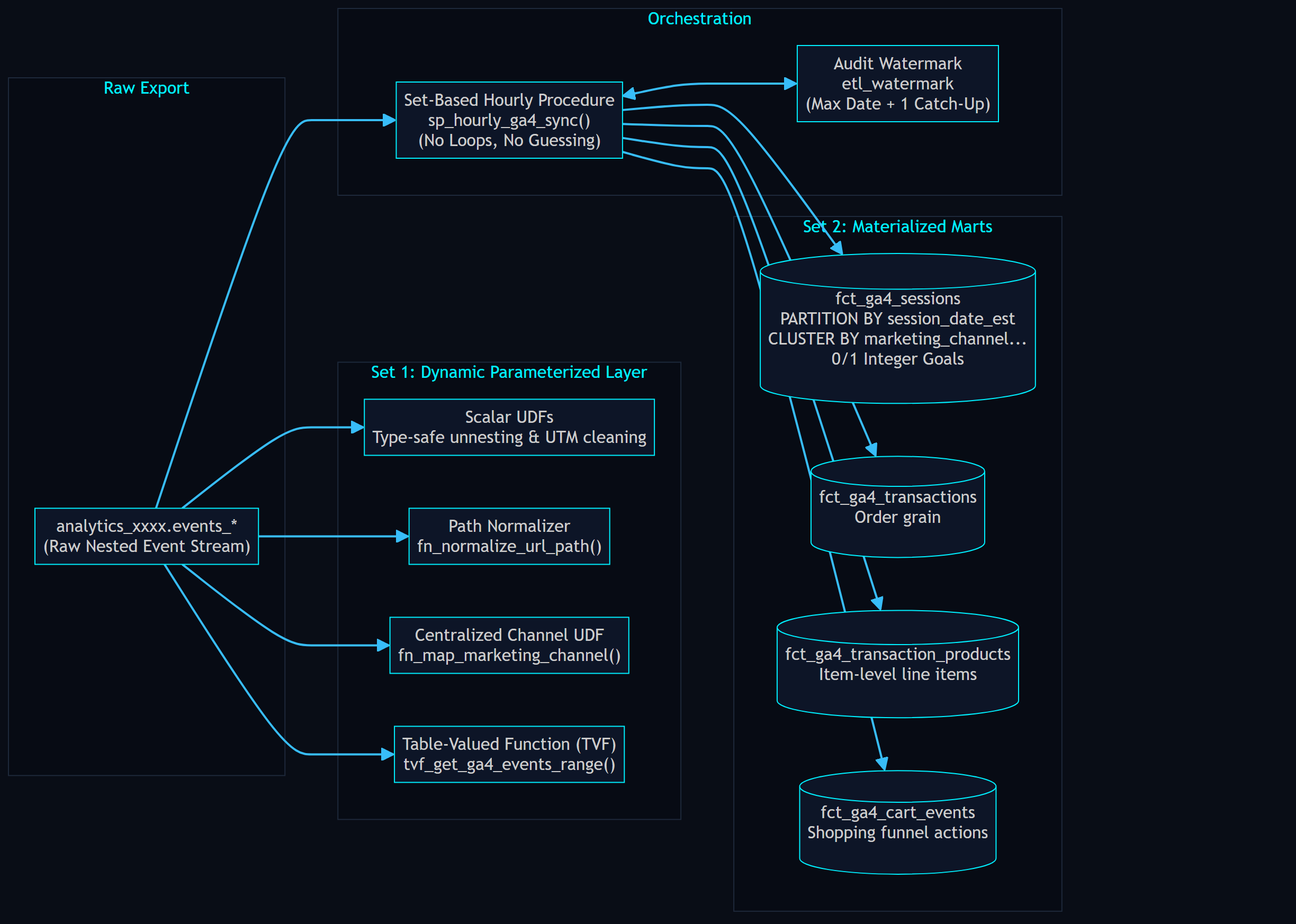
Set 1: The Dynamic Parameterized Query Layer (On-the-Fly Slice & Dice)
Built for data scientists, analytics engineers, and exploratory queries where materializing tables isn't necessary.
- Persistent Scalar UDFs: Standardize parsing for string, integer, and numeric event parameters, URL query decoding, and Eastern Time conversion.
- Path Normalization UDF:
fn_normalize_url_pathcleans landing page URLs by removing query parameters, hash fragments, and trailing slashes. - Centralized Marketing Channel UDF:
fn_map_marketing_channelencapsulates all channel rules into a single reusable definition. - Parameterized Table-Valued Function (TVF):
ga4_utils.tvf_get_ga4_events_range(start_date, end_date)allows users to query arbitrary date ranges with clean, flattened fields, lowercased UTMs, centralized marketing channels, and Eastern Time alignment without writing a singleUNNEST.
Set 2: The Materialized Production Marts (Hourly Incremental Warehouse)
Built for fast executive dashboards, BI reporting, and automated marketing feeds. Four partitioned and clustered physical tables updated every hour:
fct_ga4_sessions: Unified session grain with daily date partitioning (PARTITION BY session_date_est), clustering bymarketing_channel, user_pseudo_id, session_id, 0/1 integer goal flags, lowercased UTMs, Eastern Time timestamps (session_start_est,session_end_est), normalized navigation pathing, and consent status.fct_ga4_transactions: Deduplicated purchase orders with revenues, taxes, shipping, coupons, channel attribution, and session attribution.fct_ga4_transaction_products: Unnested item-level line items with SKUs, categories (item_category,item_category_2,item_category_3), quantities, and item revenues.fct_ga4_cart_events: Granular shopping event stream (view_item,add_to_cart,remove_from_cart,view_cart,begin_checkout).
3. Centralized Marketing Channel Mapping via UDF
A major source of technical debt in modern analytics teams is divergent channel definitions. When the Paid Media team builds a Looker dashboard, they often define Paid Social differently than the Finance team does in their dbt model.
Our framework introduces ga4_utils.fn_map_marketing_channel as the single source of truth across the entire data warehouse:
CREATE OR REPLACE FUNCTION `ga4_utils.fn_map_marketing_channel`(
  source STRING,
  medium STRING,
  campaign STRING,
  referrer STRING,
  landing_page_path STRING
)
RETURNS STRING
AS (
  CASE
    -- Rule 1: High-Priority Strategic Partnerships & Co-Marketing Portals
    WHEN landing_page_path LIKE '/partners%'
      OR landing_page_path LIKE '/co-marketing%'
      OR landing_page_path LIKE '/alliances%'
      OR LOWER(referrer) LIKE '%partnerportal.com%'
      OR LOWER(referrer) LIKE '%strategicpartner.org%'
      OR source IN ('strategic_partner', 'cobrand_partner', 'enterprise_affiliate')
      THEN 'Strategic Partnerships'

    -- Rule 2: Dedicated Influencer & Creator Landing Pages
    WHEN landing_page_path LIKE '/creators%'
      OR landing_page_path LIKE '/influencers%'
      OR medium IN ('influencer', 'creator', 'collab')
      THEN 'Influencer / Creator'

    -- Rule 3: Paid Search
    WHEN medium IN ('cpc', 'ppc', 'paidsearch', 'paid_search')
      OR (source IN ('google', 'bing', 'yahoo', 'duckduckgo', 'baidu') AND medium IN ('cpc', 'ppc'))
      THEN 'Paid Search'

    -- Rule 4: Paid Social
    WHEN medium IN ('paidsocial', 'paid_social', 'social_cpc', 'social_paid', 'social-cpc', 'paid-social')
      OR (source IN ('facebook', 'instagram', 'meta', 'tiktok', 'linkedin', 'pinterest', 'twitter', 'x', 'snapchat')
          AND (medium IN ('cpc', 'cpm', 'paid', 'ad', 'social_ad', 'paidad') OR campaign LIKE '%paid%'))
      THEN 'Paid Social'

    -- Rule 5: Organic Social
    WHEN medium IN ('social', 'social_network', 'social_media', 'sm', 'org_social', 'organic_social')
      OR source IN ('facebook', 'instagram', 'tiktok', 'linkedin', 'pinterest', 'twitter', 'x', 't.co', 'reddit', 'threads')
      OR LOWER(referrer) LIKE '%instagram.com%'
      OR LOWER(referrer) LIKE '%facebook.com%'
      OR LOWER(referrer) LIKE '%linkedin.com%'
      OR LOWER(referrer) LIKE '%tiktok.com%'
      OR LOWER(referrer) LIKE '%reddit.com%'
      THEN 'Organic Social'

    -- Rule 6: Email Marketing
    WHEN medium IN ('email', 'e-mail', 'newsletter', 'edm', 'flow', 'campaign_email')
      OR source IN ('klaviyo', 'mailchimp', 'braze', 'activecampaign', 'hubspot', 'sailthru', 'customerio')
      THEN 'Email'

    -- Rule 7: Affiliates
    WHEN medium IN ('affiliate', 'affiliates', 'aff')
      OR source IN ('rakuten', 'impact', 'shareasale', 'awin', 'cj', 'pepperjam')
      OR landing_page_path LIKE '/affiliate%'
      THEN 'Affiliates'

    -- Rule 8: Paid Video
    WHEN medium IN ('video', 'cpm_video')
      OR (source IN ('youtube', 'vimeo', 'hulu') AND medium IN ('cpc', 'cpm', 'paid'))
      THEN 'Paid Video'

    -- Rule 9: Organic Search
    WHEN medium = 'organic'
      OR source IN ('google', 'bing', 'yahoo', 'duckduckgo', 'ecosia', 'baidu')
      OR LOWER(referrer) LIKE '%google.%'
      OR LOWER(referrer) LIKE '%bing.%'
      OR LOWER(referrer) LIKE '%duckduckgo.%'
      THEN 'Organic Search'

    -- Rule 10: Referral (Generic non-partner web links)
    WHEN medium IN ('referral', 'referrals', 'link')
      OR (referrer IS NOT NULL AND referrer NOT IN ('', '(not set)') AND NOT (LOWER(referrer) LIKE '%google.%' OR LOWER(referrer) LIKE '%bing.%'))
      THEN 'Referral'

    -- Rule 11: Direct
    WHEN (source IS NULL OR source IN ('(direct)', 'direct'))
      AND (medium IS NULL OR medium IN ('(none)', '(not set)', 'none'))
      THEN 'Direct'

    -- Fallback
    ELSE 'Other'
  END
);
Key Architectural Capabilities
1. Defining Channels Based on Landing Page Alone
In many organizations, high-impact traffic arrives without UTM parameters because links are shared organically or distributed through co-marketing agreements. By passing landing_page_path into the UDF, a session landing on /partners/acme or /creators/summer can be immediately mapped to Strategic Partnerships or Influencer / Creator-even if the UTMs are completely empty or (direct).
2. Elevating Strategic Partner Referrers Above Generic "Referral"
Standard GA4 dumps every external website link into Referral. But if your brand has a major co-marketing partnership with an enterprise vendor or portal (e.g. partnerportal.com), dumping that traffic into generic referrals hides its ROI. Our UDF inspects the referrer domain and elevates strategic alliances into their own channel before generic referral fallback rules apply.
3. Trailing Slash Normalization via fn_normalize_url_path
Urls frequently arrive as /partners/enterprise/ or /partners/enterprise?utm_source=ad. If an analyst writes WHERE landing_page = '/partners/enterprise', visits with trailing slashes or query strings are dropped.
Our normalization function cleans this in a single call:
CREATE OR REPLACE FUNCTION `ga4_utils.fn_normalize_url_path`(url STRING)
RETURNS STRING
AS ((
  SELECT
    CASE
      WHEN cleaned_path IS NULL OR cleaned_path IN ('', '/') THEN '/'
      ELSE REGEXP_REPLACE(cleaned_path, r'/+$', '')
    END
  FROM (
    SELECT LOWER(TRIM(
      COALESCE(
        REGEXP_EXTRACT(url, r'^[a-zA-Z]+://[^/?#]+([^?#]*)'),
        REGEXP_EXTRACT(url, r'^([^?#]*)')
      )
    )) AS cleaned_path
  )
));4. The Maintenance Trade-Off: Pre-Materialization vs. Query-Time Execution
A central architectural decision in analytics engineering is deciding where the channel mapping logic should execute.
Approach A: Pre-Materialized Column in fct_ga4_sessions (Our Implementation)
In our architecture, sp_hourly_ga4_sync executes the UDF at ingest time and permanently writes marketing_channel to fct_ga4_sessions.
- The Advantages:
- Zero Query-Time CPU Overhead: Dashboards load instantly because BigQuery reads a simple pre-computed string.
- Partition & Cluster Pruning: Because the table is clustered on
CLUSTER BY marketing_channel, ..., a query filteringWHERE marketing_channel = 'Paid Search'scans only the specific storage blocks containing Paid Search rows, saving 80%+ on query scan costs.
- The Operational Trade-off (What Happens When Rules Change?):
If marketing reclassifies an affiliate network or creates a new channel rule, updating the UDF does not automatically change historical rows in
fct_ga4_sessions.The Remediation: You must run a targeted partition update to refresh historical sessions:
UPDATE `ga4_marts.fct_ga4_sessions`
SET marketing_channel = `ga4_utils.fn_map_marketing_channel`(
  utm_source,
  utm_medium,
  utm_campaign,
  page_referrer,
  landing_page_path
)
WHERE session_date_est BETWEEN '2026-09-01' AND '2026-10-27';
Approach B: Query-Time Dynamic UDF Execution
Alternatively, you can omit the physical column and invoke fn_map_marketing_channel(...) dynamically inside a SQL query or a dynamic BigQuery VIEW.
- The Advantages:
Instant Rule Propagation: Any edit to the UDF is immediately reflected across all queries with zero backfilling or DML updates.
- The Disadvantages:
- Significant Compute Costs (Slot Exhaustion): BigQuery must execute complex string matching and regex logic for every single session row on every single dashboard refresh.
- Loss of Cluster Pruning: You cannot cluster on a dynamically computed function call.
5. The Hourly Ingestion Engine: No Loops, No Guessing Games, Pure Set-Based BigQuery
Many data teams fall into one of two orchestration anti-patterns:
- The Rolling Lookback Anti-Pattern: Guessing with a blunt
INTERVAL 3 DAYMERGE every hour, creating resource contention and wasting slot-hours when zero new data has landed. - The Procedural Loop Anti-Pattern: Writing cursor or procedural
FORloops to process days one by one, forfeiting BigQuery's massive MPP parallel processing power.
The dbmarketer Philosophy: Set-Based Wildcard Extraction
Google's daily export model has two fundamental rules:
10/25/2026sessions do not arrive over multiple days. When Google finishes and deliversevents_20261025, that daily export table is closed and settled.- BigQuery is a set-based engine. If you need to catch up across 3 missing days, you don't iterate through them one at a time. You query the wildcard table with
_TABLE_SUFFIX >= v_next_process_dateand process all 3 days in parallel in a single query!
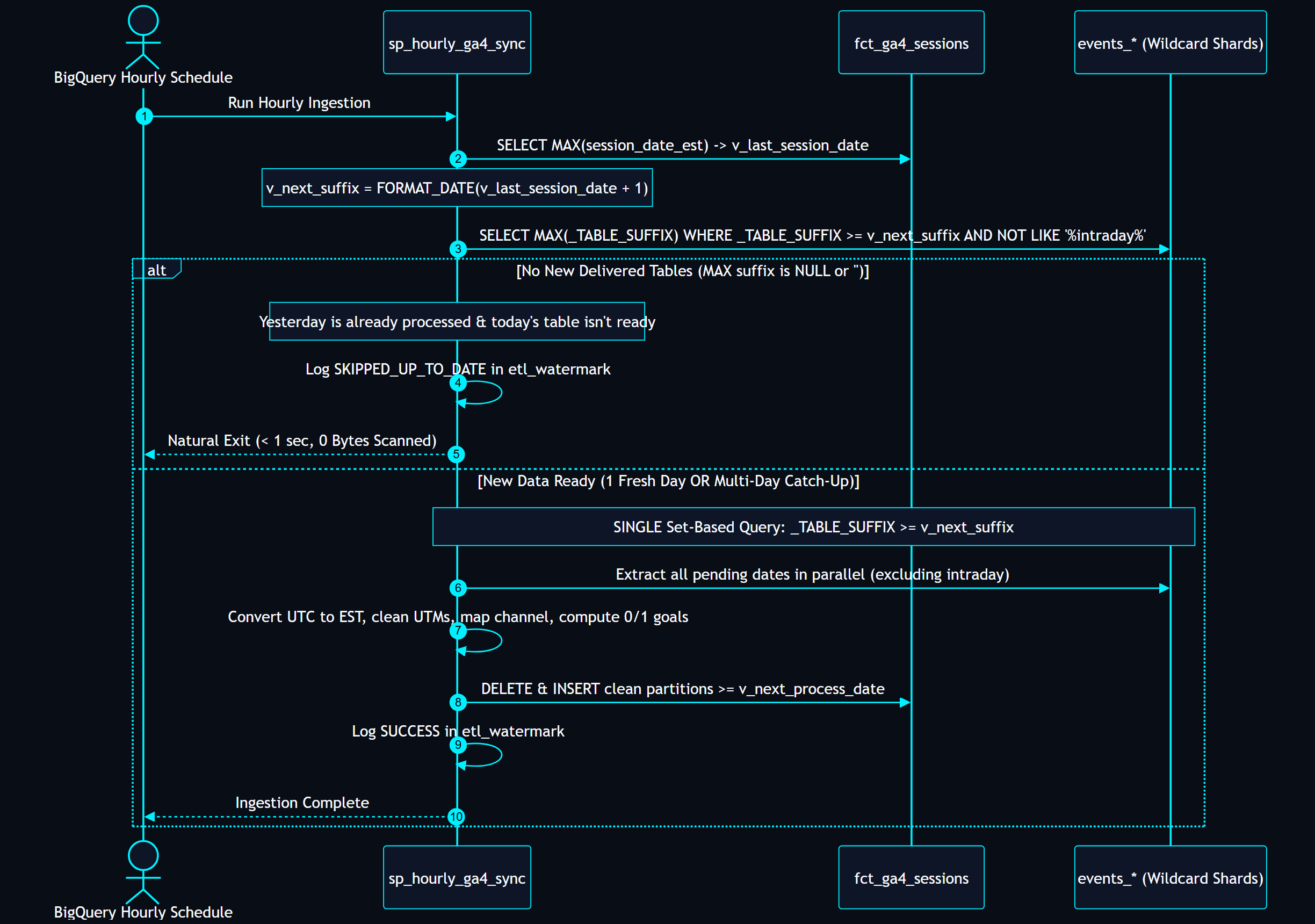
The Three Operational Scenarios Handled Flawlessly:
Scenario 1: Normal Hourly Run (Natural Idle Exit)
- It's 2:00 PM on October 27th.
fct_ga4_sessionshas data up to October 26th (yesterday).- The procedure checks for
_TABLE_SUFFIX >= '20261027'(today). - Because today is still in progress, Google has not finalized
events_20261027. - The metadata check returns
NULL. - The procedure logs
SKIPPED_UP_TO_DATEand terminates in under 1 second. Zero bytes scanned, zero query slots consumed.
Scenario 2: Google Delivers Yesterday's Table
- It's 6:00 AM on October 27th. Google finishes processing and delivers
events_20261026. - The procedure checks: Last processed date was
2026-10-25. Next suffix is'20261026'. - The metadata check returns
MAX(_TABLE_SUFFIX) = '20261026'. - The single set-based query extracts and materializes all sessions for
2026-10-26in seconds. - At 7:00 AM, 8:00 AM, and 9:00 AM, the procedure runs, sees
_TABLE_SUFFIX >= '20261027'is not yet ready, and naturally exits.
Scenario 3: Catch-Up Mode (Google 48h Delay or 3-Day Job Outage)
- Suppose the job was paused over a 3-day long weekend, or Google experienced an upstream pipeline delay and delivers 3 days of backlog at once (
20261024,20261025,20261026). - Last processed date is
2026-10-23. Next suffix is'20261024'. - The metadata check returns
MAX(_TABLE_SUFFIX) = '20261026'. - No loop is executed. The procedure runs a single set-based query:
WHERE _TABLE_SUFFIX >= '20261024'
  AND NOT REGEXP_CONTAINS(_TABLE_SUFFIX, r'intraday')
BigQuery processes all 3 days concurrently across hundreds of parallel workers, writes the three date partitions into fct_ga4_sessions, and updates the watermark in one atomic run.
Deploying the Routines & Setting Up the Hourly Scheduled Call
In BigQuery terminology, User-Defined Functions (both scalar and table-valued) and Stored Procedures are formally catalogued as Routines.
1. The Routine Source Scripts
All routines are provided in two ready-to-run formats in the sql/ directory:
- Consolidated All-In-One Script (
sql/01_create_all_routines.sql): Deploys all 11 BigQuery routines in one single execution (all 9 scalar UDFs, the 1 TVF, and thesp_hourly_ga4_syncstored procedure). - Modular Scripts:
sql/01_udfs.sql: Deploys the 9 parsing and channel-mapping scalar UDFs and thetvf_get_ga4_events_rangetable-valued function.sql/03_procedure_hourly_sync.sql: Deploys thesp_hourly_ga4_syncstored procedure.
- Scheduling Guide (
sql/05_schedule_hourly_sync.sql): Contains the SQL trigger, console instructions, bq CLI command, and Terraform definition.
2. Setting Up the Hourly Scheduled Call via BigQuery Console UI
Once the routines are created, set up the hourly scheduled execution directly in Google Cloud Console:
- Open BigQuery Studio (
https://console.cloud.google.com/bigquery). - Paste the routine execution statement into the Query Editor:sql
CALL `your_project_id.ga4_marts.sp_hourly_ga4_sync`(NULL); - Click the Schedule dropdown in the query toolbar and choose Create new scheduled query.
- Configure the scheduled query settings:
- Name for scheduled query:
ga4_marts_hourly_sync - Repeats:
Hourly - Starts: Default (Immediately)
- Dataset: Leave blank (the stored procedure handles all table destination writes)
- Destination table: Leave blank
- Location: Select your dataset region (e.g.
USorEU)
- Name for scheduled query:
- Click Save. BigQuery will now trigger the routine at minute 0 of every hour.
3. Setting Up the Hourly Scheduled Call via Google Cloud CLI (bq mk)
Alternatively, deploy the scheduled query with a single terminal command:
bq mk \
  --transfer_config \
  --project_id="YOUR_PROJECT_ID" \
  --data_source=scheduled_query \
  --display_name="GA4 Marts Hourly Sync" \
  --schedule="every 1 hours" \
  --location="US" \
  --params='{"query":"CALL `YOUR_PROJECT_ID.ga4_marts.sp_hourly_ga4_sync`(NULL);"}'
4. Monitoring the Hourly Routine
Every hourly run records its progress, processed row counts, and status in ga4_marts.etl_watermark:
SELECT
  execution_timestamp,
  table_name,
  last_processed_date_est,
  rows_processed,
  execution_status,
  notes
FROM `ga4_marts.etl_watermark`
ORDER BY execution_timestamp DESC
LIMIT 20;6. Date Partitioning & Multi-Column Clustering Strategy
Google BigQuery pricing is based entirely on the number of bytes scanned (or slot-hours consumed). Storing millions of sessions in a non-partitioned table is a guaranteed recipe for massive cloud bills.
Daily Date Partitioning: PARTITION BY session_date_est
fct_ga4_sessions is partitioned by the Eastern Time business date (session_date_est).
CREATE TABLE IF NOT EXISTS `ga4_marts.fct_ga4_sessions` (
  ...
)
PARTITION BY session_date_est
CLUSTER BY marketing_channel, user_pseudo_id, session_id
When an analyst queries:
WHERE session_date_est >= DATE_SUB(CURRENT_DATE('America/New_York'), INTERVAL 30 DAY)BigQuery automatically prunes all partitions outside that 30-day window. Years of historical web traffic are completely ignored, reducing query bytes scanned by 90% to 98%.
Multi-Column Clustering: marketing_channel, user_pseudo_id, session_id
Within each date partition, BigQuery collocates data blocks based on clustering keys:
marketing_channel: Placed first in the clustering list because almost every marketing report filters by channel (WHERE marketing_channel = 'Paid Social').user_pseudo_id: Enables rapid user-level stitching and cohort retention lookups.session_id: Speeds up session deduplication and cross-table joins with orders.
7. The 0/1 Integer Goal Flag Revolution
In web analytics, businesses live and die by conversion funnels. In our target architecture, we assume five core ecommerce and lead generation goals:
view_item(Product Detail Page View)add_to_cart(Cart Addition)checkout(Initiated Checkout)purchase(Completed Order)newsletter_signup(Lead or Email Capture)
Why Binary INT64 (0 or 1) Flags are Superior
In fct_ga4_sessions, each goal is evaluated as a strict INT64 with values of only 0 or 1:
MAX(IF(event_name = 'view_item', 1, 0)) AS has_view_item,
MAX(IF(event_name = 'add_to_cart', 1, 0)) AS has_add_to_cart,
MAX(IF(event_name IN ('begin_checkout', 'checkout'), 1, 0)) AS has_checkout,
MAX(IF(event_name = 'purchase', 1, 0)) AS has_purchase,
MAX(IF(event_name IN ('newsletter_signup', 'email_signup', 'lead', 'sign_up'), 1, 0)) AS has_newsletter_signup
This simple architectural shift unlocks mathematical superpowers:
- Volume via
SUM(): The count of sessions reaching a goal is simplySUM(has_goal). Because addition is commutative and associative, BigQuery aggregates these fields using high-speed SIMD vector processing. - Conversion Rate via
AVG(): The conversion rate of any goal across any slice of data is simplyAVG(has_goal). For example,AVG(has_purchase)returns0.0342(a 3.42% conversion rate). - Trivial BI Setup: In Looker Studio or Power BI, drag
has_purchaseinto your scorecard or table:- Aggregation =
SUM→ Instant Total Conversions. - Aggregation =
AVERAGE→ Instant Conversion Rate %.
- Aggregation =
- Additive Multi-Goal Funnels in a Single Pass:
-- Clean, Fast, Additive Channel Funnel
SELECT
  marketing_channel,
  COUNT(1) AS total_sessions,

  -- Volumes
  SUM(has_view_item) AS views,
  SUM(has_add_to_cart) AS cart_adds,
  SUM(has_checkout) AS checkouts,
  SUM(has_purchase) AS purchases,
  SUM(has_newsletter_signup) AS leads,

  -- Micro-Conversion Rates
  ROUND(AVG(has_view_item) * 100, 2) AS view_rate_pct,
  ROUND(AVG(has_add_to_cart) * 100, 2) AS cart_rate_pct,
  ROUND(AVG(has_checkout) * 100, 2) AS checkout_rate_pct,
  ROUND(AVG(has_purchase) * 100, 2) AS purchase_cvr_pct,
  ROUND(AVG(has_newsletter_signup) * 100, 2) AS lead_cvr_pct
FROM `ga4_marts.fct_ga4_sessions`
WHERE session_date_est >= DATE_SUB(CURRENT_DATE('America/New_York'), INTERVAL 30 DAY)
GROUP BY marketing_channel
ORDER BY purchases DESC;8. The Timezone Trap: UTC Event Timestamp vs. Admin Property Timezone
One of the most insidious bugs in GA4 BigQuery pipelines is the mismatch between event timestamps and reporting dates.
The Underlying Mechanics
event_timestamp: Stored as an integer representing microseconds elapsed since the Unix epoch (January 1, 1970). This timestamp is ALWAYS in UTC.event_date: Stored as a string (e.g.'20261027'). This date is determined by the Reporting Timezone configured in your GA4 Property Admin settings (for example,America/New_YorkorAmerica/Los_Angeles).
The Midnight Boundary Bug
Imagine a customer in New York purchases an item at 9:30 PM EST on October 27, 2026:
- Local Time (New York):
2026-10-27 21:30:00 EST - UTC Equivalent:
2026-10-28 01:30:00 UTC - GA4
event_datein table:'20261027'(Because GA4 admin is set to New York) - GA4
event_timestampin table:1793151000000000(UTC microseconds)
If an analyst writes:
-- WRONG: Defaults to UTC calendar date
SELECT
  DATE(TIMESTAMP_MICROS(event_timestamp)) AS session_date,
  COUNT(1)
FROM raw_events
GROUP BY 1;
BigQuery casts the timestamp to UTC date: October 28th. Meanwhile, the GA4 UI reports the transaction on October 27th. The CEO compares the dashboard against the GA4 UI, sees mismatched daily revenues, and assumes the data warehouse is broken.
The Solution: Explicit Microsecond-to-Eastern Conversion
Our pipeline introduces dedicated functions that explicitly convert UTC timestamps to America/New_York (handling both Standard Time and Daylight Saving Time automatically):
CREATE OR REPLACE FUNCTION `ga4_utils.fn_utc_to_est_datetime`(ts_micros INT64)
RETURNS DATETIME
AS (
  DATETIME(TIMESTAMP_MICROS(ts_micros), 'America/New_York')
);

CREATE OR REPLACE FUNCTION `ga4_utils.fn_utc_to_est_date`(ts_micros INT64)
RETURNS DATE
AS (
  DATE(TIMESTAMP_MICROS(ts_micros), 'America/New_York')
);
In fct_ga4_sessions, we partition on session_date_est, ensuring that session durations (DATETIME_DIFF(session_end_est, session_start_est, SECOND)), daily rollups, and hour-of-day charts align 100% with real-world US commercial hours.
9. Consent Mode v2: Retaining Unconsented Users
Under Google Consent Mode v2, visitors who reject tracking cookies emit cookieless pings (privacy_info.analytics_storage = 'NO'). In these pings:
- GA4 does not read or write the
_gacookie. user_pseudo_idis eitherNULLor replaced with an ephemeral string.- The parameter
ga_session_idis completely omitted from rawevent_params.
Why Naive Pipelines Drop 20% to 40% of Users
Most engineers write their session extraction as:
-- WRONG: Silently deletes unconsented traffic!
SELECT
  user_pseudo_id,
  (SELECT value.int_value FROM UNNEST(event_params) WHERE key = 'ga_session_id') AS session_id
FROM raw_events
WHERE user_pseudo_id IS NOT NULL;
By doing this, every unconsented user is dropped from your reporting warehouse. Your site traffic drops, your customer acquisition cost (CAC) calculations are skewed, and your bounce rates become inaccurate.
The dbmarketer Fallback Strategy
Our architecture refuses to discard unconsented visitors. We handle them by:
- Creating a deterministic synthetic session key using BigQuery's
FARM_FINGERPRINTacross the anonymous payload:sqlCOALESCE( IF(user_pseudo_id IS NOT NULL AND session_id IS NOT NULL, CONCAT(user_pseudo_id, '.', CAST(session_id AS STRING)), NULL), CONCAT('anon.', event_date, '.', CAST(FARM_FINGERPRINT(CONCAT(COALESCE(user_pseudo_id, 'unconsented'), CAST(event_timestamp AS STRING), COALESCE(geo.country, ''))) AS STRING)) ) AS session_key - Storing explicit consent columns on each session:
consent_status:'GRANTED','DENIED', or'UNKNOWN'.is_consented:1(Granted) or0(Denied/Cookieless).
This preserves true site traffic baselines while enabling powerful privacy analytics, such as comparing the conversion propensity of consented vs. unconsented visitors.
10. The UTM Normalization Framework: Lowercasing & The 9-Parameter Matrix
Attribution errors in web analytics are rarely caused by math; they are caused by string casing and redirect stripping.
The Case Sensitivity Trap
In SQL, string comparisons are case-sensitive:
'Facebook' != 'facebook' != 'FACEBOOK'When campaign managers run paid ads across different teams, variations in UTM capitalization create split rows in grouping tables. Even worse, GA4's channel grouping rules fail to match title-cased parameters, tossing paid media traffic into (Unassigned).
Our pipeline enforces rigorous normalization via ga4_utils.fn_clean_utm:
CREATE OR REPLACE FUNCTION `ga4_utils.fn_clean_utm`(raw_val STRING)
RETURNS STRING
AS (
  NULLIF(LOWER(TRIM(REGEXP_REPLACE(raw_val, r'\+', ' '))), '')
);- Forces all characters to lowercase.
- Trims leading and trailing whitespace.
- Replaces URL-encoded
+symbols with standard spaces. - Converts empty strings
''into true SQLNULLs.
Full Spectrum Coverage: All 9 UTM Parameters
Our schema models the full 9-parameter matrix, including Google's modern paid media taxonomy:
| PARAMETER | TYPE | BUSINESS DEFINITION | TYPICAL PRODUCTION VALUE |
|---|---|---|---|
| utm_source | STRING | The entity sending the traffic | google, facebook, klaviyo, tiktok |
| utm_medium | STRING | The marketing mechanism | cpc, paid_social, email, affiliate |
| utm_campaign | STRING | The strategic campaign name | spring_sale_2026, brand_search_exact |
| utm_term | STRING | Search query keyword or targeting audience | running shoes, lookalike_3pct |
| utm_content | STRING | Specific ad creative, copy variant, or link | hero_banner_blue, copy_v2_cta_shop |
| utm_id | STRING | External platform Campaign / Ad ID | cid_192847193 |
| utm_source_platform | STRING | Specific buying tool or ad engine | google ads, dv360, sa360, meta ads |
| utm_creative_format | STRING | Visual layout / ad format | carousel, single_image, video_reel |
| utm_marketing_tactic | STRING | Funnel stage or campaign objective | prospecting, retargeting, retention |
11. Production Schema Data Dictionary: fct_ga4_sessions
| COLUMN NAME | TYPE | DESCRIPTION |
|---|---|---|
| session_key | STRING | Primary key (user_pseudo_id.session_id or synthetic anonymous hash) |
| session_date_est | DATE | Partition Key: Session start date in Eastern Time (America/New_York) |
| session_start_est | DATETIME | First event timestamp in Eastern Time |
| session_end_est | DATETIME | Last event timestamp in Eastern Time |
| session_duration_seconds | INT64 | Total active session duration in seconds |
| user_pseudo_id | STRING | Cluster Key 2: GA4 client cookie identifier (NULL for unconsented users) |
| session_id | INT64 | Cluster Key 3: Session counter timestamp from gtag.js (ga_session_id) |
| session_number | INT64 | Ordinal session count for the user (ga_session_number) |
| consent_status | STRING | 'GRANTED', 'DENIED', or 'UNKNOWN' |
| is_consented | INT64 | Binary flag: 1 if consented, 0 otherwise |
| landing_page | STRING | Full raw entry page URL |
| landing_page_path | STRING | Normalized entry page path (query params & trailing slash stripped) |
| landing_page_title | STRING | Page title of the entry page |
| exit_page | STRING | Exit page URL |
| page_referrer | STRING | HTTP referrer recorded at session start |
| page_views | INT64 | Count of page_view events in session |
| event_count | INT64 | Total events in session |
| marketing_channel | STRING | Cluster Key 1: Centralized channel mapped via fn_map_marketing_channel |
| utm_source | STRING | Cleaned lowercased traffic source |
| utm_medium | STRING | Cleaned lowercased medium |
| utm_campaign | STRING | Cleaned lowercased campaign |
| utm_term | STRING | Cleaned lowercased keyword/term |
| utm_content | STRING | Cleaned lowercased ad content |
| utm_id | STRING | Cleaned lowercased campaign ID |
| utm_source_platform | STRING | Cleaned lowercased source platform |
| utm_creative_format | STRING | Cleaned lowercased creative format |
| utm_marketing_tactic | STRING | Cleaned lowercased marketing tactic |
| device_category | STRING | desktop, mobile, or tablet |
| device_os | STRING | Operating system |
| device_browser | STRING | Browser name |
| geo_country | STRING | Visitor country |
| geo_region | STRING | Visitor region / state |
| geo_city | STRING | Visitor city |
| has_view_item | INT64 | 1 if viewed product page, 0 otherwise |
| has_add_to_cart | INT64 | 1 if added to cart, 0 otherwise |
| has_checkout | INT64 | 1 if began checkout, 0 otherwise |
| has_purchase | INT64 | 1 if completed purchase, 0 otherwise |
| has_newsletter_signup | INT64 | 1 if triggered newsletter/lead signup, 0 otherwise |
| total_purchase_revenue | NUMERIC | Total order revenue generated in session |
| total_items_purchased | INT64 | Total units purchased in session |
| transactions_count | INT64 | Count of transactions in session |
| processed_at | TIMESTAMP | Timestamp when row was transformed |
12. Conclusion & Next Steps
Transforming raw Google Analytics 4 data into an executive-grade warehouse doesn't require complex third-party tools or convoluted SQL models. By taking advantage of pure BigQuery standard SQL, centralized channel mapping UDFs, 0/1 integer flags, date-partitioned storage, and a set-based wildcard procedure, data teams can build a high-performance analytics platform that scales effortlessly.
Need Help Optimizing Your Marketing Data Stack?
At Database Marketer (dbmarketer.com), we design and build enterprise-grade data platforms, dbt models, and custom AI agent skills for high-growth ecommerce and subscription brands.
- • Explore our services: dbmarketer.com
- • Schedule an Architecture Review:
- • Open-Source Repository: github.com/rudy0903/dbmarketer/tree/main/ga4-bigquery-schema
13. DIY Implementation Guide: Git Repository & Script Inventory
For data teams ready to deploy this architecture into their own Google Cloud environment, all assets are packaged into a modular, production-tested Git repository. This section provides an architectural overview of what is contained in the Git repository and a functional summary of what each script does-allowing you to execute Option #1 (Turnkey Automated Deployment) quickly and reliably without needing to manually copy and paste code blocks.
What is in the Git Repository
The repository is structured into four core directories:
scripts/(Automated Orchestration): Turnkey deployment scripts designed for CI/CD runners, Google Cloud Shell, and local developer workstations (macOS, Linux, and Windows PowerShell).sql/(Database Assets & Routines): Pure BigQuery SQL files containing dataset initialization, 11 compiled routines (9 scalar UDFs, 1 table-valued function, and 1 stored procedure), partitioned table DDLs, analytical business queries, and scheduling templates.schemas/(BigQuery JSON Schemas): Production-ready JSON schema definitions matching BigQuery's native table definition format for automated schema validation, migration tools, or deployment viabq mk --schema.- Root Documentation & Licensing: The comprehensive architectural whitepaper (
ARTICLE.md), an interactive executive HTML document (ARTICLE.html), the repository guide (README.md), and an Apache 2.0 open-source license (LICENSE).
Script Inventory & Functional Summary
The table below summarizes each file in the repository, its target BigQuery object or operational scope, and what it executes:
| DIRECTORY | SCRIPT / ASSET | TARGET OBJECT / SCOPE | FUNCTIONAL SUMMARY |
|---|---|---|---|
| scripts/ | deploy_all.sh | Bash / Linux / Cloud Shell | Option #1 Turnkey Deployer (Mac/Linux): Validates GCP credentials, resolves the active project ID, executes all SQL steps sequentially (datasets → routines → tables), and schedules the hourly routine call via bq mk. |
| scripts/ | deploy_all.ps1 | Windows PowerShell | Option #1 Turnkey Deployer (Windows): Native PowerShell equivalent of deploy_all.sh. Automates parameter passing, execution order, error trapping, and scheduled query creation. |
| sql/ | 00_init_datasets.sql | ga4_marts, ga4_utils, ga4_staging | Initializes the isolated BigQuery datasets with descriptions and location flags, establishing clean boundaries between raw staging, utilities, and analytical marts. |
| sql/ | 01_create_all_routines.sql | 11 BigQuery Routines | All-in-One Routine Installer: Compiles and registers all 9 scalar UDFs, the 1 table-valued function (tvf_get_ga4_events_range), and the sp_hourly_ga4_sync stored procedure in a single execution. |
| sql/ | 01_udfs.sql | Scalar UDFs & TVF | Modular Routine Script: Instantiates the 9 parameter-parsing, URL-normalizing, timezone-converting, and channel-mapping functions, plus the dynamic ad-hoc querying TVF. |
| sql/ | 02_ddl_tables.sql | 5 Mart Tables | Provisions the physical storage layer: etl_watermark, fct_ga4_sessions, fct_ga4_transactions, fct_ga4_transaction_products, and fct_ga4_cart_events. Enforces daily Eastern Time date partitioning (PARTITION BY session_date_est) and multi-column clustering. |
| sql/ | 03_procedure_hourly_sync.sql | ga4_marts.sp_hourly_ga4_sync | Modular Ingestion Engine: Creates the set-based stored procedure that checks for new settled data, handles multi-day backlogs concurrently via _TABLE_SUFFIX, enforces idempotent partition rewrites, and records execution logs. |
| sql/ | 04_analytical_queries.sql | Analytical Query Library | Contains 6 production-grade SQL templates demonstrating 0/1 integer goal aggregation, channel performance reporting, strategic partner referrer audits, retroactive rule updates, and cost-comparison benchmarks. |
| sql/ | 05_schedule_hourly_sync.sql | Scheduling & Monitoring | Provides the single-line routine caller (CALL ga4_marts.sp_hourly_ga4_sync(NULL);), step-by-step BigQuery Studio UI configuration instructions, the bq mk --transfer_config CLI command, and Terraform IaC definitions. |
| schemas/ | *.schema.json | Table Definitions | 4 BigQuery JSON schema definitions detailing field names, types, nullability modes, and inline column documentation for automated CI/CD validation. |
Executing Option #1: Turnkey Deployment
To deploy the entire architecture into your Google Cloud project in under 5 minutes:
- Clone the repository:bash
git clone https://github.com/rudy0903/dbmarketer.git cd dbmarketer/ga4-bigquery-schema - Execute the automated deployment script:Linux / macOS / Google Cloud Shell:Windows (PowerShell):bash
chmod +x scripts/deploy_all.sh ./scripts/deploy_all.sh "your-gcp-project-id" "US"powershell.\scripts\deploy_all.ps1 -ProjectId "your-gcp-project-id" -Location "US" - Verify Execution Health:
Once triggered, inspect the
etl_watermarktable to confirm the ingestion pipeline is operational:sqlSELECT * FROM `ga4_marts.etl_watermark` ORDER BY execution_timestamp DESC LIMIT 10;